Overview
This section discusses what a zonal configuration is and how to set it up.
Zonal Configuration
This feature allows for more granular network analysis by breaking the main grid into smaller sub-regions.
iPool vs. WESM Terminology
Before creating a zonal database, it's crucial to understand the "opposite convention" for naming between iPool and WESM:
- iPool Convention:
- Zones: The 3 large areas (Luzon, Visayas, Mindanao).
- Regions: The 14 smaller sub-regions (what WESM calls zones).
- WESM Convention:
- Regions: The 3 large areas.
- Zones: The 14 smaller sub-regions.
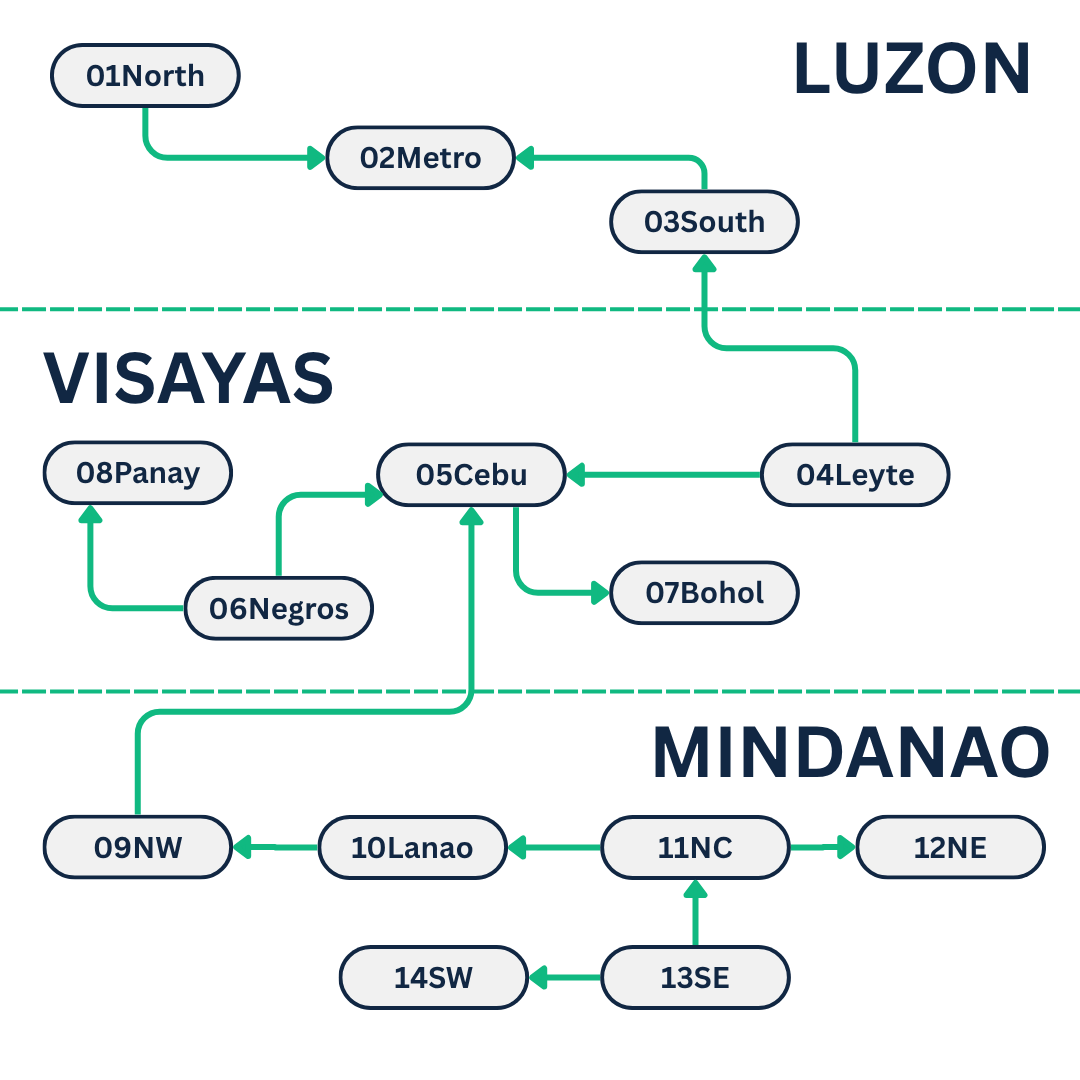
Why the difference? iPool calculates flow between regions (the 14 smaller areas), hence its naming choice.
How to Create a Zonal Database
Follow the phases below to convert your conventional database into a zonal database.
- Phase 1: Database Setup
- Phase 2: Execution
- Phase 3: Verification
1
Copy the Database
Make a copy of your existing database (e.g., SysWESM25T.mdb) and give it a new name to serve as your zonal database (e.g., SysWESMZONES.mdb).
copy /y .\Databases\SysWESM25T.mdb .\Databases\SysWESMZONES.mdb
note
SysWESMZONES.mdb is the dedicated database used for your new zonal configuration.